Agents do the routine. You make the calls.
Sorting e-mail, filing invoices in the right folder, scanning the post, spreadsheets that fill themselves and calls you can't pick up. We set up agents that do this every day and only ask you where a person is needed.
An agent is a colleague for one job
It isn't a chatbot you have to talk to. An agent has one precise job, does it on its own and always the same way. When it isn't sure, it doesn't guess: it asks you.
- 01
Something happens
An e-mail, an invoice, a letter or a form order comes in, or the phone rings.
- 02
The agent handles it
It reads it, files it, fills in what's needed and checks it against your rules and confirmed facts.
- 03
Done, or a question
The routine is done and logged. Anything that goes out or costs money waits for your one-click OK.
What we can automate
For each agent we say plainly whether it already runs in the Hub or is set up on request for a particular business.
Runs in the HubOn request
-
Photo01On request
E-mail inbox
Every morning the agent sorts your mail, drafts replies to everyday questions and sends you the important things in one short summary.
For example
- A question about opening hours has a draft reply within minutes.
- Invoices from e-mail go straight to the invoice agent.
- At 7:00 one summary: three things that need you today.
-
Photo02On request
Invoices to your drive
The agent reads invoices from e-mail and paper, names them the same way and files them in the folder you choose. Your accountant finds them all in one place.
For example
- A folder for your accountant every month, no forwarding.
- A reminder three days before an invoice is due.
- A cost sheet by supplier at the end of the month.
-
Photo03On request
Scanning post and documents
Take a photo of letters, delivery notes, contracts or notes from the counter. The agent reads them, files them and tells you if something needs doing.
For example
- A letter from an authority with a deadline shows up in your calendar.
- Delivery notes by job, all in one place.
- Searching "lease 2024" finds the scanned paper too.
-
Hub screenshot04On request
Google Drive and the cloud
Tidy folders, spreadsheets that fill themselves, forms and calendar. All in your own Google or Microsoft account, not with us.
For example
- A new job gets a folder with a quote template and a place for photos.
- Orders from a form are written into a sheet.
- A Monday summary: what's new and what's waiting.
-
Photo05On request
Phone front desk
When you can't pick up, a voice assistant takes the call. It answers everyday questions in Slovak and Hungarian and writes down what the caller wanted.
For example
- Not one enquiry lost during lunch or on a building site.
- "Are you open on Saturday?" is answered without you.
- In the evening, a list of people to call back.
The front desk is built in the Hub; we're still setting up its Slovak phone number.
-
 06Runs in the Hub
Website enquiries
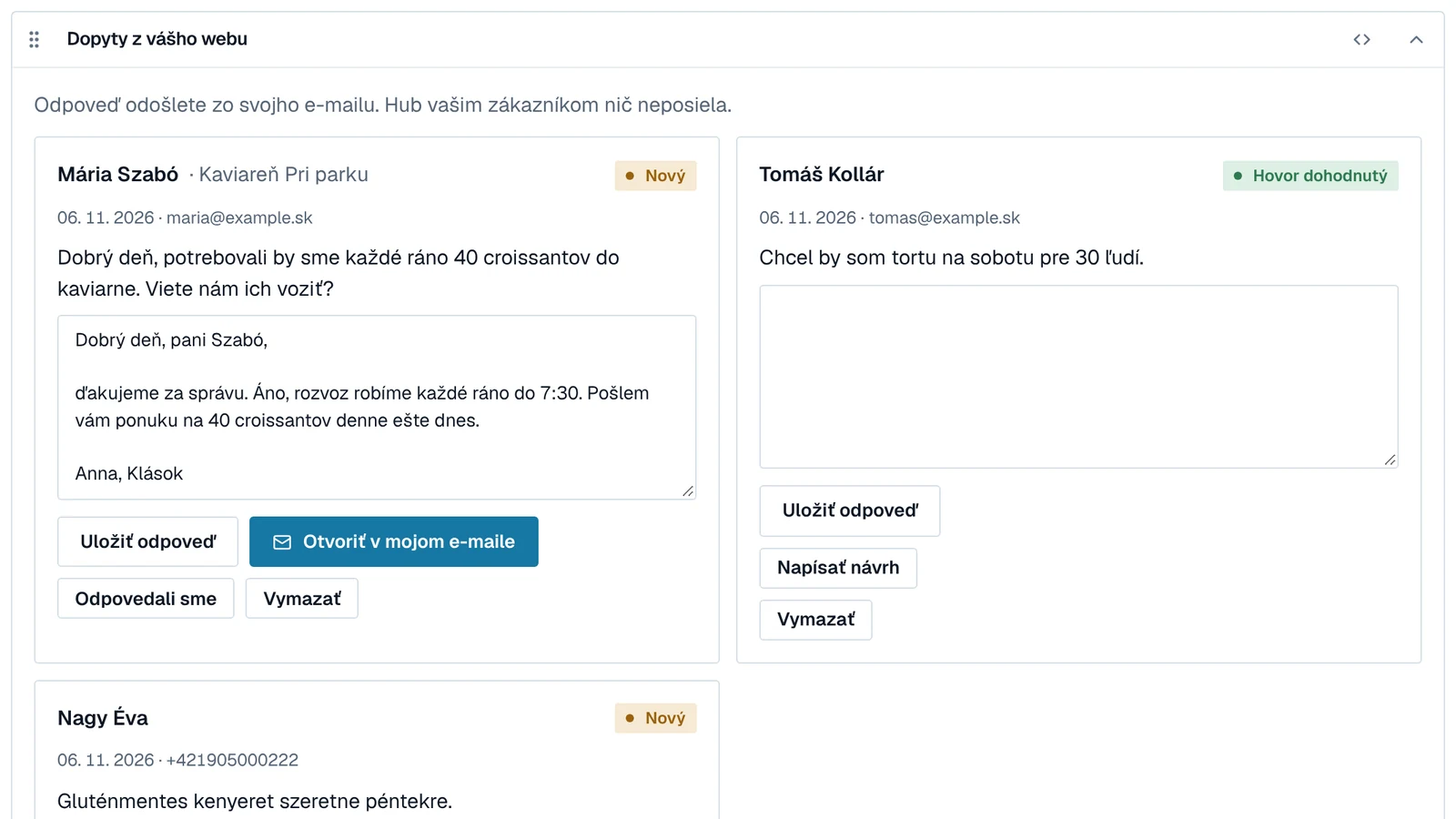
The form on your website sends an enquiry straight to the Hub. The agent drafts a reply, you check it and send it.
For example
- An enquiry on Sunday evening has a draft ready on Monday morning.
- Same question, equally accurate answer, whoever on the team replies.
- You see which enquiries are still waiting for an answer.
-
07On request
A custom agent
Is there a job someone does every week that nobody enjoys? Describe it and we'll design an agent that does it for you.
For example
- A weekly order for a supplier based on sales.
- Service reminders for regular customers.
- Tracking prices and new products from suppliers.
Better together
Agents see what's really happening in the business. Social media can tell people about it. When they're connected, posts grow out of real questions and sales, and enquiries from posts don't get lost.
E-mail and the phone show what people ask most often.
Next week the most common question becomes a post with the answer.
An invoice shows that new stock has arrived.
The social media agent suggests a post about it. You confirm the price.
A post with an offer brings enquiries through the website and phone.
The monthly report shows which post brought enquiries, not just likes.
A customer says thank you by e-mail.
With the customer's consent, the thank-you becomes a review or a post.
The social media page shows how posts are made, who approves them and how we learn from them.
How we do social mediaThis is how our own office runs
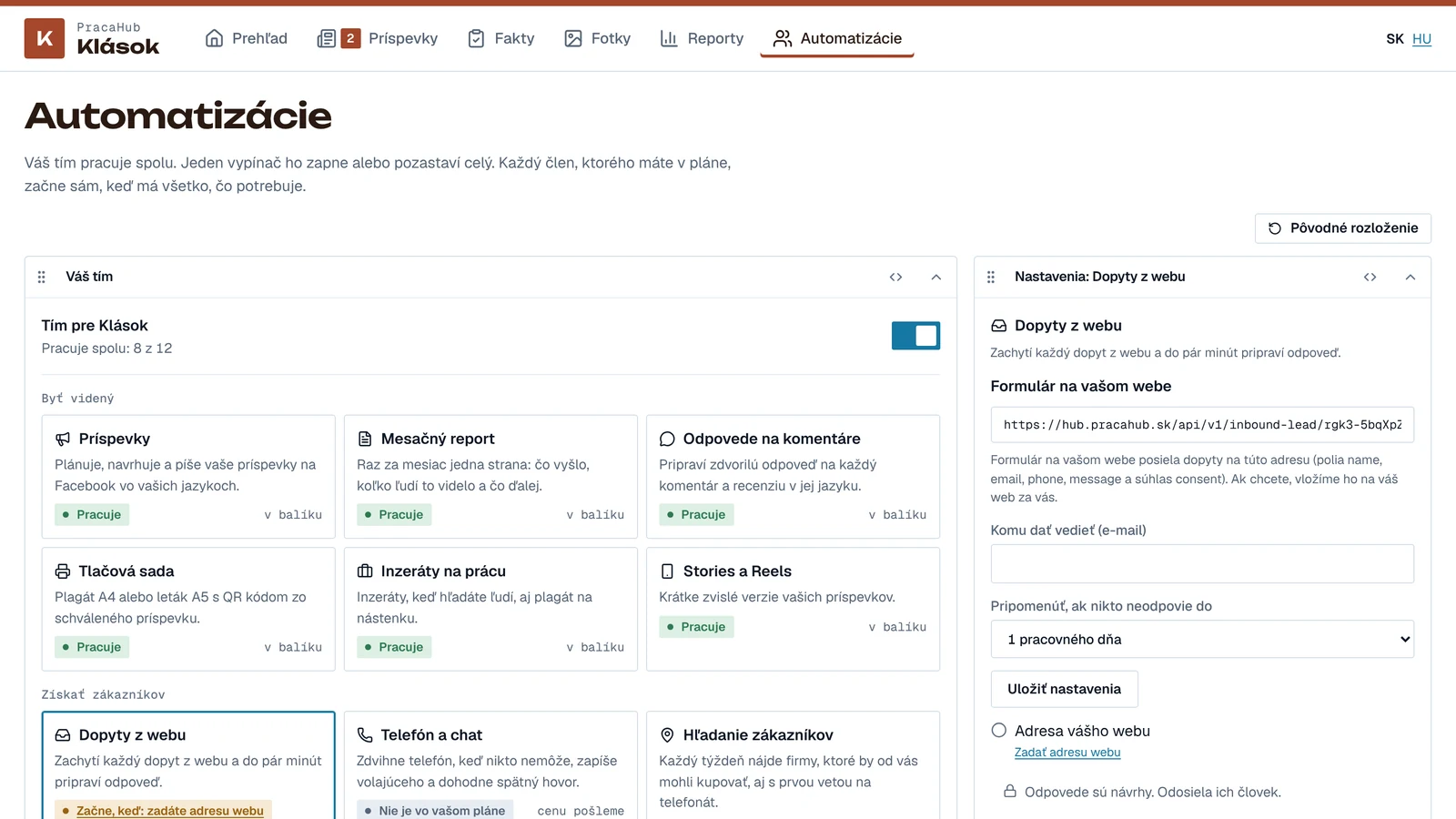
PracaHub is run by one person. Invoices, payment reminders, the post plan and replies to enquiries are prepared by agents in the same Hub you get.
In the morning the Today page shows only what is waiting for a person. The rest of the day is left for client work.
- Invoices with a PAY by square QR code and due-date reminders
- A morning Today list: only things that need a person
- Our own posts go through the same approval as clients' posts
An agent sees only what you allow
Agents work with your e-mails, invoices and documents. That's why they start with as few rights as possible, and every step can be looked up afterwards.
Nothing goes out without your OK
E-mails, replies and posts are approved by a person. Standing approval is only for safe tasks, and you can withdraw it any time.
It doesn't make up facts
Prices, dates and promises come only from what you confirmed. When something is missing, it asks.
Data in Slovakia
The Hub and your data are on a server in Slovakia. We send the AI model only what the task needs.
We never ask for passwords by e-mail or chat. You give access through the official Google or Microsoft sign-in.
One job, a two-week trial
- 01
A short call
In 30 minutes we go through what slows you down every week.
- 02
One job
We pick the one that saves the most time. You know the price up front.
- 03
Trial
For two weeks the agent works next to you and everything waits for your OK.
- 04
For real
It runs every day. When you're happy, we add the next job.
Common questions about agents
Do I need to understand the technology?
No. We set it up; you confirm the access and tell us what the agent should do. After that you see it in the Hub as a list of finished work and questions.
What if the agent makes a mistake?
Until an agent has proved itself, everything that goes out waits for your OK. Every step is logged, so we find the mistake and fix the process.
Does it work with Microsoft 365, not just Google?
Yes. Google Drive and OneDrive, Gmail and Outlook. Other systems, such as accounting software, by arrangement.
Do I need social media too?
No, you can have agents on their own. Together with social media, though, they get better results.
Which job would you hand over first?
Write us one sentence about what slows you down every week. We'll reply with an agent idea and a time for a short call.